Mastering Editable Neon Light Designs in Adobe Illustrator
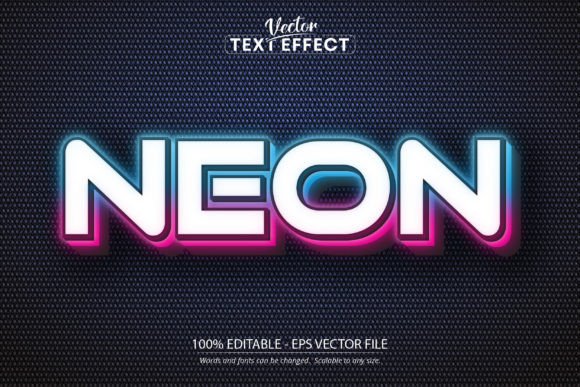
Hello there, and welcome to a comprehensive exploration of modern digital typography. In the evolving landscape of graphic design, few styles capture attention quite like the vibrant glow of neon. Whether you are a seasoned professional, an educator creating engaging materials, or a hobbyist looking to elevate your personal projects, understanding how to implement a Neon Text Effect effectively is a valuable skill. This guide delves into the intricacies of using editable neon light text styles, specifically focusing on vector-based workflows that offer scalability and precision.
The allure of neon signage has transcended its physical roots in storefronts and diners to become a staple of digital aesthetics. From cyberpunk-themed user interfaces to retro-modern branding, the glowing tube effect conveys energy, nightlife, and innovation. However, achieving this look traditionally required complex layering of gradients, outer glows, and blending modes within design software. The introduction of pre-configured, editable neon light assets has revolutionized this process, allowing creators to focus on message and composition rather than technical execution.
The Power of Vector-Based Neon Effects
At the heart of high-quality neon design lies the vector format. Unlike raster images, which can become pixelated when enlarged, vector graphics use mathematical equations to define shapes. This distinction is critical when working with text effects intended for various output sizes, from small social media icons to large-format printing. The specific design style discussed here utilizes the ADOBE ILLUSTRATOR EPS CS6 file format, ensuring compatibility with a wide range of industry-standard versions while maintaining the integrity of the visual effect.
When you utilize a dedicated neon text effect file, you are leveraging a sophisticated arrangement of paths and appearance attributes. These files are engineered so that the complex glow, tube thickness, and color saturation are preserved regardless of the characters used. It is important to note that this is not a font in the traditional sense. It is a font effect—a stylistic overlay applied to standard typography within the Adobe Illustrator environment. This distinction ensures that the visual fidelity of the neon tubes remains consistent, avoiding the common pitfalls where custom fonts might lack certain glyphs or fail to render complex ligatures correctly.
Scalability and Resolution Independence
One of the most significant advantages of using an EPS-based neon effect is its ability to be scalable to any size. In a professional setting, a designer might need to adapt a logo for a business card today and a building-sized banner tomorrow. With raster-based neon effects created in Photoshop, scaling up often results in a loss of clarity and soft, blurry edges that detract from the crispness of the light. Conversely, the vector nature of this Illustrator file means the edges of the "tubes" remain sharp and defined at any magnification. This resolution independence is essential for maintaining a polished, high-end look across all media channels.
Workflow Efficiency and Editability
Time is a crucial resource for creators. The traditional method of building a neon effect from scratch involves multiple steps: creating the base path, adding inner strokes for the glass tube, applying outer glows for the light dispersion, and adjusting blending modes to simulate illumination against a background. A pre-made, 100% editable neon text effect streamlines this workflow dramatically. By opening the provided EPS CS6 file, users gain immediate access to a fully functional template where the heavy lifting of aesthetic tuning has already been completed.
The editing process is designed to be intuitive. Users simply select the text object, type their desired message, and the effect applies automatically. This functionality is particularly beneficial for businesses that need to iterate quickly on marketing materials or educators who need to generate visually stimulating headers for presentations. The system supports very easy to edit font and text operations, meaning you can swap out the underlying typeface if the project demands a different stylistic approach, all while retaining the neon lighting characteristics.
- Rapid Prototyping: Test different slogans and headlines instantly without rebuilding the effect.
- Consistency: Ensure every piece of text in a campaign shares the exact same lighting properties and color profile.
- Flexibility: Modify colors to match brand guidelines or seasonal themes with just a few clicks.
Software Compatibility and Requirements
While the benefits of these tools are vast, it is vital to understand the technical requirements to ensure a smooth experience. This specific neon style text effect design is optimized for Adobe Illustrator. It cannot be opened with another software such as Photoshop, CorelDRAW, or free vector editors without potentially losing the specific appearance attributes that create the neon illusion. The reliance on Illustrator's proprietary appearance panel and gradient mesh capabilities is what allows for such a realistic and dynamic result.
The file format provided is EPS CS6. This choice ensures backward compatibility, allowing users with slightly older versions of the Creative Suite to still access the tool, while remaining fully functional in the latest CC versions. Inside the download package, users will typically find the main EPS file, a preview JPG for quick reference, and an information Readme.pdf file containing specific instructions. Adhering to the software constraints is not a limitation but a guarantee of quality; by restricting the environment to Illustrator, the creator ensures that the Neon Text Effect performs exactly as intended without cross-platform rendering errors.
Real-World Applications Across Industries
The versatility of an editable neon light text style extends far beyond simple artistic expression. Various sectors can leverage this aesthetic to communicate specific brand values or capture audience attention.
Marketing and Advertising: In the crowded digital marketplace, standing out is paramount. Neon effects evoke a sense of urgency and excitement, making them ideal for sale announcements, event promotions, and limited-time offers. The glowing nature of the text naturally draws the eye, increasing click-through rates on social media ads and email headers.
Entertainment and Nightlife: For clubs, bars, music festivals, and gaming tournaments, neon is more than a style; it is part of the cultural identity. Using a scalable vector neon effect allows these entities to create cohesive branding across merchandise, stage backdrops, and digital tickets. The ability to customize the text means that event names and dates can be updated effortlessly for each new occurrence.
Educational and Informational Content: Educators and researchers often struggle to make dry data engaging. Incorporating a modern neon aesthetic into infographics or presentation titles can stimulate interest among students and peers. It signals a contemporary approach to the subject matter, bridging the gap between academic rigor and modern visual communication trends.
Small Business Branding: Local shops, cafes, and boutiques often aim for a "hipster" or retro-modern vibe. A digital neon logo can serve as the cornerstone of their visual identity, translating seamlessly from their website to the actual physical signage they might commission later. The vector file serves as a perfect blueprint for fabricators who need clean lines to bend glass or LED strips.
Considerations for Effective Implementation
While the tool is powerful, effective design requires thoughtful application. When using a Neon Text Effect, context is key. Neon inherently implies darkness or low-light environments to maximize the contrast of the glow. Placing bright neon text on a white background can sometimes reduce the impact unless a dark drop shadow or backing is added to simulate the environment. Designers should consider the background color carefully to ensure the "light" appears to emit rather than just sit on top of the canvas.
Furthermore, readability should never be sacrificed for style. While the twisting, glowing tubes of a neon sign are beautiful, overly complex scripts or thin fonts can become illegible when scaled down for mobile screens. The editable neon light templates allow users to switch fonts, so it is advisable to test bold, sans-serif typefaces for clarity alongside more decorative scripts for display purposes. The font included in the preview is for demonstration purposes only, reminding users that they have the freedom to choose typography that best suits their specific legibility needs.
Maximizing the Potential of Your Design Assets
To truly make a difference in your projects with this new text effect, one must explore the full range of customization available within Illustrator. Beyond changing the text content, users can manipulate the stroke weights, adjust the opacity of the glow layers, and even animate the paths if exporting for web or video use. The modular nature of the EPS file means that the "tube" and the "glow" are often on separate sub-layers within the appearance stack, granting granular control over the final look.
For those interested in motion graphics, these vector files serve as excellent starting points for After Imports. Because the paths are clean and the structure is logical, animating the "power-up" sequence of a neon sign—where letters flicker on one by one—is significantly easier than trying to rotoscope a raster image. This bridges the gap between static graphic design and dynamic motion content, expanding the utility of the asset.
In conclusion, the integration of a specialized Neon Text Effect into your design toolkit offers a blend of aesthetic appeal and practical efficiency. By utilizing an ADOBE ILLUSTRATOR EPS CS6 file that is 100% editable, creators bypass the technical hurdles of effect creation and focus on the creative narrative. Whether you are designing a logo, a poster, or a digital ad, the ability to instantly apply a professional-grade, scalable neon glow empowers you to produce high-impact visuals that resonate with audiences. As you explore the contents of the zip file—including the EPS, the preview, and the documentation—you are not just downloading a graphic; you are adopting a workflow that prioritizes quality, flexibility, and modern design standards.
We hope this detailed overview helps you understand the value and application of editable neon styles. With the right tools and a clear understanding of vector workflows, you can illuminate your projects and bring a vibrant, electric energy to your visual communications. Best regards, and happy designing.